Design
Custom CSS
With Custom CSS, you can perfectly adapt your survey to your brand and corporate design. Your surveys can be enhanced with your own font as well as special elements of your brand.
In the survey creation, you will find the Custom CSS feature at the very bottom within the Style tab:
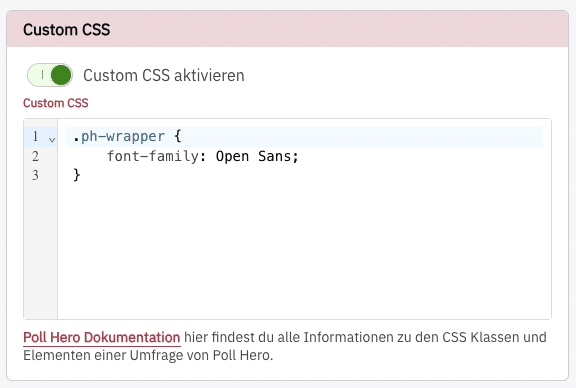
If you want to use your website’s font, you can simply use
* { font-family: inherit!important; }Then your website’s font will be used throughout the entire survey.
Layout & container
.ph-wrapper.ph-survey
Works only for the Stand-Alone survey, as it does not use a Shadow DOM.
.ph-survey-host.ph-survey-host--full-image.ph-survey-host--side-image.ph-box-inner.ph-box-outer.ph-bg--left.ph-bg--main.ph-bg--right
Works only for the Onsite survey.
.ph-survey-minimized.ph-overlay
Header & branding
.ph-header.ph-header__branding.ph-header__close.ph-topbar.ph-topbar__back.ph-topbar__close.ph-topbar--close-only.ph-branding.ph-branding__logo.ph-branding__text.ph-title.ph-subtitle
Avatar
.ph-avatar.ph-avatar__info.ph-avatar__name.ph-avatar__title
Questions & text
.ph-question__body.ph-question__title.ph-question__description.ph-length-hint
Buttons
.ph-btn--primary.ph-btn--secondary.ph-btn--action
Works only for the Stand-Alone survey.
.ph-extra-btn.ph-extra-btn-container
Input fields
.ph-input--checkbox.ph-input--radio.ph-input--text-inline.ph-input--short(Short Free Text).ph-input--long(Long Free Text).ph-input--email
Answer options (standard)
.ph-options.ph-option
Rating (stars, NPS, etc.)
.ph-rating--large.ph-rating--small.ph-rating__elements.ph-rating__element.ph-rating__btn--star.ph-rating__btn--nps.ph-rating__btn--number.ph-rating__btn--full.ph-rating__context.ph-rating__label
Emoji
.ph-emoji.ph-emoji__item
Matrix
.ph-matrix.ph-matrix__container.ph-matrix__row
Dropdown
.ph-dropdown__btn.ph-dropdown__answer.ph-dropdown__arrow.ph-dropdown__content.ph-dropdown__list
Ranking
.ph-ranking.ph-ranking__item.ph-ranking__item--dragging.ph-ranking__item--drag-over.ph-ranking__drag-icon.ph-ranking__dropdown.ph-ranking__icon.ph-ranking__number.ph-ranking__number-block.ph-ranking__text
Progress bar
.ph-progress.ph-progress__track.ph-progress__fill.ph-progress__info.ph-progress__label.ph-progress__label-row.ph-process-bar.ph-process-bar__segment
Opt-in
.ph-optin.ph-optin__label.ph-optin__notice
Warnings & errors
.ph-warning(maximum number of allowed selections reached in a Multi Select question).ph-error(a required question was not answered or an invalid email address was entered)