Embedded survey – Direct Injection
In the Launch tab, you can decide how to integrate your Embedded survey. If you choose the CSS Selector option instead of the embed code, you can use Direct Injection to decide exactly where the survey should be positioned. It is then embedded using CSS selectors and combinators.
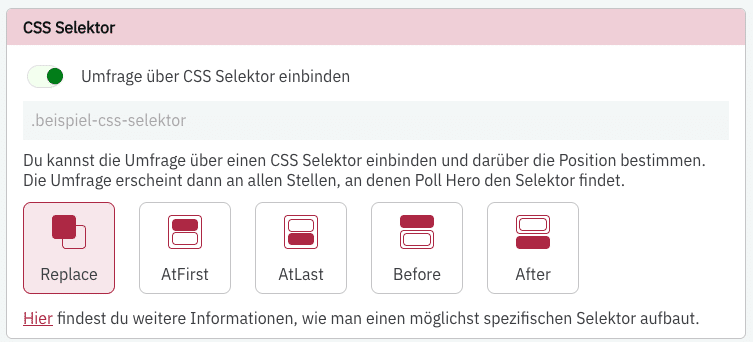
With Direct Injection, you can “find” specific elements on your page. PollHero then injects the survey at the first location that matches the selected element.
You can choose from five options:
- Replace: Replaces the element found via the selectors with the survey. The target element is removed from the page.
- At First: If the target element is a container with multiple elements, the survey will be placed in the first position within that container.
- At Last: If the target element is a container with multiple elements, the survey will be placed in the last position within that container.
- Before: The survey is placed directly before the start of the target element.
- After: The survey is placed directly after the end of the target element.
To use Direct Injection, enter your CSS selector into the input field above the position selection. You can then use general targeting to set which pages PollHero should search for the target element.
If the target element does not appear within 10 seconds after the page has loaded, the survey is not embedded on that page.
An Embedded survey only counts as shown once the area containing the survey is scrolled into the visitor's visible area. If the survey is embedded far down the page, you will therefore see fewer impressions than page views. Learn more in How we count impressions, responses and rates.